
See which courts fill up and what the club collects.
Make decisions using your club’s bookings and payments. Review reserved hours, booking lengths, revenue and purchased packages for the period you choose.
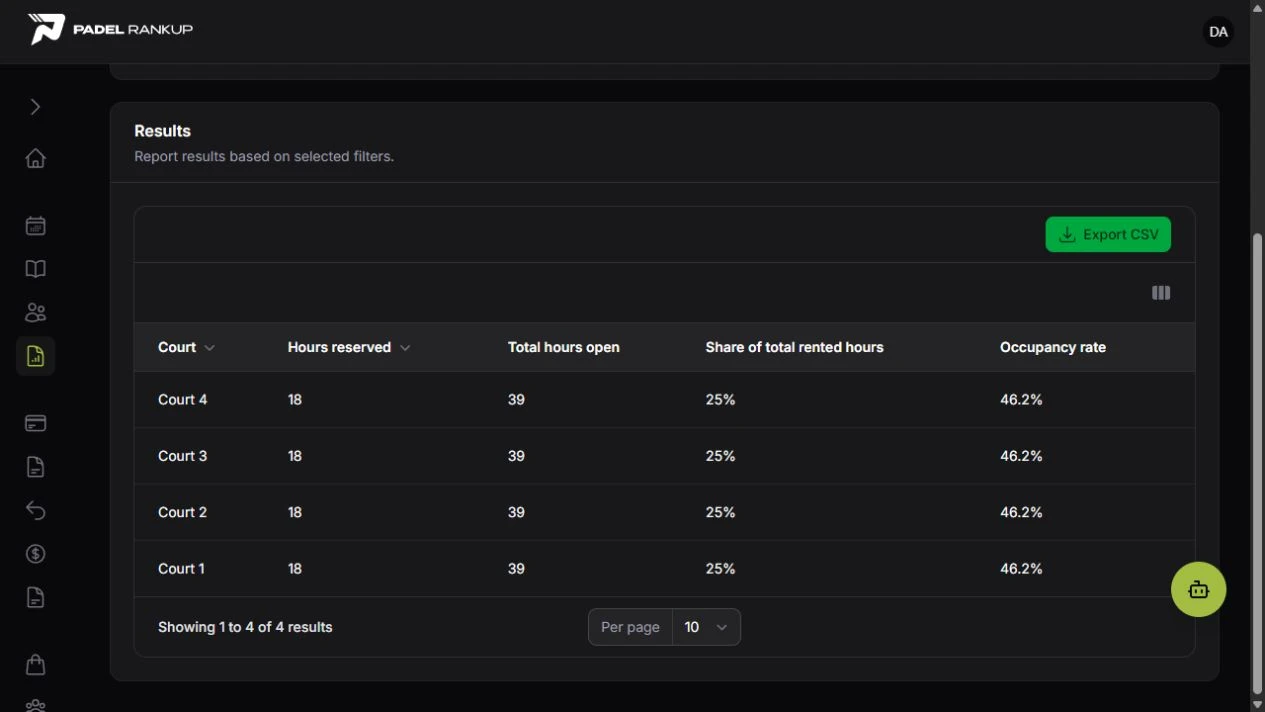
Occupancy by court
Check reserved hours and occupancy percentages. Compare courts over the same period to identify where your offer needs attention.
Traceable payments
Filter payments by date, method and status. Review invoices and spending per player, with currency filters where needed.
Data you can work with
Export tables to CSV for further analysis or your colleagues. Staff access to reports is controlled through roles.
In practice
Review a promotion before repeating it.
Select the campaign period and examine relevant bookings and payments. Use the results to decide which slots to promote next.
Benefits
For your club
Evaluate a promotion or a quiet period using the relevant dates. Compare booked hours and revenue before deciding which offer or activity to prepare next.
For the player
An offer based on actual activity can create more playing options at suitable times. The club has data for planning community activities.
Setup and activation
See how it works for your club.
Request a demonstration of this feature. Then we will help configure the right settings for your club.
For setup, we agree on:
We identify the periods and reports you need and who can access them. Reports concern the selected club, not other partners’ figures.
Frequently asked questions
Can I export reports?
Yes, tables support CSV export. Membership and training reports show packages held during a period, not a ledger of every session.
Can I compare court occupancy?
Yes. View booked hours and occupancy percentages for each court over the selected period.
Can I filter revenue by payment method?
Yes. Payment reports include period, method and status filters. Totals can be viewed by currency.
Who can access club reports?
Access is controlled through staff roles and permissions. The data belongs to the selected club.
Let’s see how it would work for your club.
See how management, promotion and community connect: from visibility in search engines and the app to booking and the next visit.